

Publish Date
06/07/2026
Categories
Blogs
Cloud migrations rarely fail because the final workload move is impossible. They fail because the strategy was unclear before the migration started. Without agreement on business goals, dependencies, security, costs, ownership and sequencing, even a technically successful migration can result in disruption, overspend, or poor adoption.
A well-defined cloud migration strategy gives your organisation clarity before any workloads are moved.
What is a cloud migration strategy?
A cloud migration strategy is the plan that connects your business objectives with the practical decisions needed to move workloads safely. It defines what should move, why it matters, and how success will be measured.
This includes identifying business drivers, classifying workloads (move, change, or retire), setting security and compliance requirements, and defining cost models. It also shapes your cloud migration roadmap – ensuring Azure migration planning aligns with real outcomes, not just technical preference.
Why cloud migration strategy matters before workload movement
Migration is not just a technical project. Without a clear strategy, businesses risk lifting existing inefficiencies into the cloud.
Common issues include poor understanding of workload dependencies, underestimating performance needs, unclear governance, and inaccurate cost modelling.
Many organisations also overlook backup, recovery and post-migration ownership – creating problems later rather than solving them.
Cloud migration strategy vs cloud readiness assessment vs migration plan
These terms are often used interchangeably but serve different roles:
- A cloud readiness assessment evaluates your current environment and highlights any gaps.
- A cloud migration strategy determines what should move and why.
- A migration plan defines how the move will happen – timelines, phases, and execution steps.
The strategy sits in the middle, connecting insight to delivery.

Steps to building a cloud migration strategy
Step 1 – Define business goals and migration drivers
Start by understanding why you are moving to the cloud.
Common drivers include:
- Replacing ageing infrastructure
- Improving security or resilience
- Supporting hybrid work
- Reducing on-premises dependency
- Preparing for AI, automation, or Copilot
- Scaling applications or modernising legacy systems
- Improving disaster recovery and business continuity
Decisions should always tie back to business outcomes, not just technical preference.
Step 2 – Assess the current estate and workload dependencies
Effective cloud migration planning starts with discovery. You need a complete picture of your environment, including applications, servers, data locations and integrations.
Understanding authentication dependencies, network requirements, legacy systems and third-party tools ensures your strategy reflects reality. Without this, migration risks increase significantly.
Step 3 – Decide what should move, change, stay or retire
The biggest opportunity in cloud migration planning is not how you move things – but deciding what not to move.
For example, a legacy app used by five people may be better replaced than migrated.
Some can be quickly rehosted for speed, while others may be replatformed or refactored to improve performance and take advantage of cloud capabilities.
In some cases, it makes more sense to replace legacy systems, retire unused workloads, or retain certain systems on-premises to support a direct-to-cloud or hybrid-first approach where it best fits the business.

💡Practical tip: Challenge every workload with one question: “Would we build this the same way today?” If not, it’s an ideal opportunity to improve or replace it.
Step 4 – Build the target architecture and landing zone approach
Before moving workloads, your strategy should define the target cloud environment (typically platforms like Microsoft Azure) to avoid reactive decisions later.
This includes structuring subscriptions and resource groups, setting up identity with Entra ID, and designing network connectivity. It should also cover security, backup, monitoring, cost controls, and governance, so the environment stays consistent and manageable from the start. You’ll also need to think about when’s right to train your team on the new apps, services or procedures in the new environment which will impact their work day.
Step 5 – Plan security, compliance and resilience from the start
Security should be built into your strategy (and not added later!). This means defining MFA and conditional access, controlling privileged access, and setting clear rules for data protection and classification from the outset (data labelling).
You should also plan endpoint management, along with backup and recovery testing to ensure systems can be restored when needed.
Broader business continuity requirements and any sector-specific compliance obligations should be factored in your strategy plan, alongside ongoing security monitoring after migration.
When moving to the cloud, your environment and identity setup will likely be very different from your current setup. If security decisions are left too late, this can create gaps, rework, or increased risk after migration.
Step 6 – Model costs, licensing and commercial decisions
Your strategy should clarify the financial impact before anything moves, starting with current costs and a realistic (if you’re going to use it) – Azure forecast.
Focus on right-sizing workloads, using options like Azure Hybrid Benefit or reserved instances where appropriate, and reviewing any Microsoft 365 licence changes.
Your strategy should also define how costs will be managed after migration, especially who owns optimisation and cost control. Most overspending can actually happen after migration, so ongoing cost governance is essential.
Step 7 – Create the migration roadmap
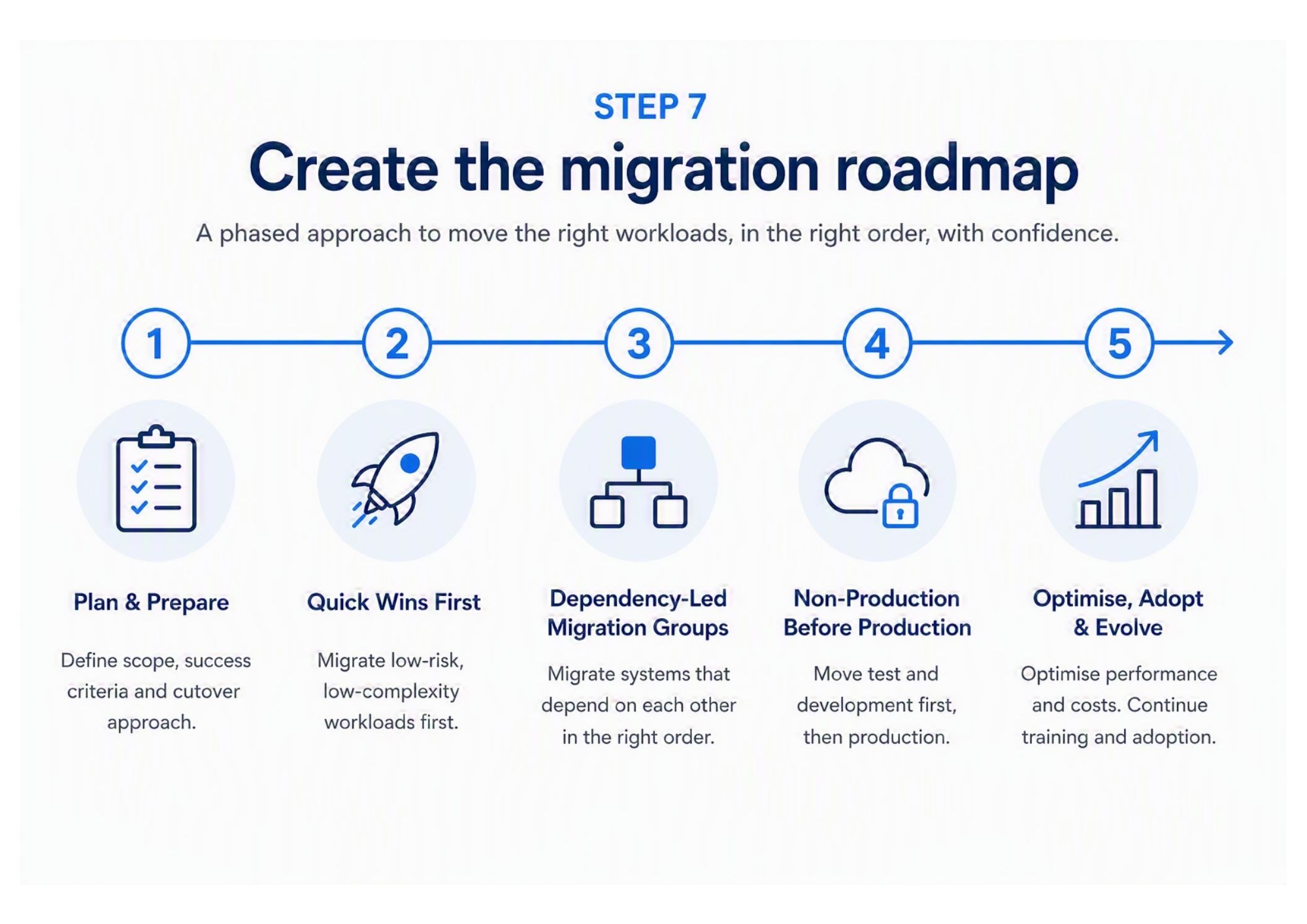
A roadmap is needed so you can set the order of what moves and when and avoid trying to do everything at once. Start with quick-win workloads, then move dependency-led migration groups (systems that rely on each other, such as an app and its database, so they’re migrated together or in the right order), with non-production before production where appropriate (non-production means test or development systems that won’t impact the business if something goes wrong).
More critical applications should come later, once testing has built confidence. Clear cutover windows and rollback criteria help manage risk, while stakeholder approval points and communications and training milestones keep the business aligned.
A strong cloud migration roadmap should also consider how users will work differently after migration: training, communication and adoption should be planned alongside the technical migration, not added later.
💡Practical tip: A phased approach keeps migration controlled – whereas trying to move everything at once increases risk and disruption. Include user training in each phase so the business keeps pace with the technology.
Step 8 – Plan operational ownership after migration
This is where many strategies fall short – workloads are moved and planned for, but once the new environment goes live, there might not now be a plan…
You need clear internal ownership, defined service desk responsibilities, and processes for monitoring and incident response.
Like in step 7, you should also plan for ongoing user adoption, as new systems often change how people work. Without continued support, users may revert to old processes or underuse new tools.
Ongoing tasks like cost reviews, security posture checks, backup testing, and governance reporting should be scheduled and owned. It’s also important to decide whether you need help to manage your infrastructure, such as managed Azure services to support your team long-term.
It’s vital to remember that migration isn’t the finish line – you need to have clear ownership on your infrastructure, or else costs, performance, and security can quickly become a catch up game.
Example scenario: ageing infrastructure and no internal Azure capacity
A 150-person business with ageing on-premises servers may want to reduce hardware reliance but lack the in-house experience to plan an Azure move. Instead of jumping straight into migration, a cloud migration strategy would first define clear business goals (such as cost reduction and resilience), then map dependencies across applications, data, and identity.
From there, workloads can be classified (what to move, replace or retire), and costs modelled to avoid future surprises. The strategy would also define a target Azure environment and create a phased roadmap, starting with piloting of lower-risk systems before progressing to critical workloads. It would then define the management of the Azure environment after the migration had been successful.
This approach ensures the migration is structured, cost-aware, and aligned with business priorities – rather than driven by guesswork.
How to choose a cloud migration strategy partner
If you’re looking to find a migration partner, choosing the right partnership can make a significant difference to the success of your migration.
Look for proven Microsoft and Azure expertise, along with real-world migration delivery experience – not just advisory.
They should be able to assess your current environment, understand dependencies, and provide clear, actionable documentation and roadmaps by listening to you and what your business needs are.
Strong security and compliance capability is also essential, alongside knowledge of cost optimisation to ensure long-term value. Finally, consider whether they can support you beyond migration with managed services, giving you continuity once workloads are live.
As a Microsoft Solutions Partner, we combine Azure consultancy, migration delivery, managed Azure services, and cyber security expertise to support customers across the full cloud journey – or simply provide guidance where it’s needed most.